Profile
Version: 1.0.1
Route: /profile
Who can access: Users with View on settings (Sidebar → Settings → Profile)
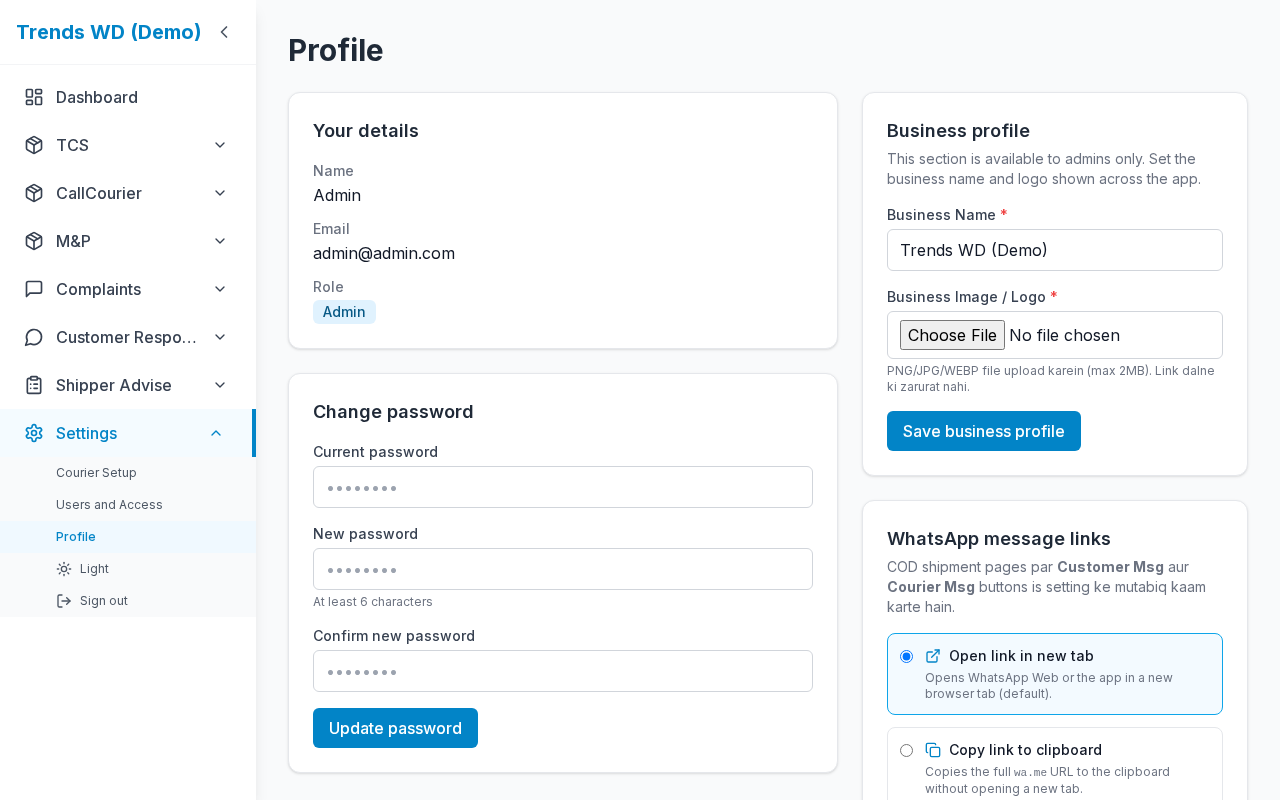
What this page does
Every user can change their password. Admins also set business branding (name + logo) and WhatsApp link mode (open tab vs copy link) used by Customer Msg.
Layout at a glance
| Section | Who |
|---|---|
| Account info (name, email, role) | Everyone (read-only) |
| Change password | Everyone |
| Business profile | Admin |
| WhatsApp link mode | Admin (as shown in UI) |
Steps
Change password
- Open Settings → Profile.
- Under Change password, enter Current password, New password, Confirm new password.
- Click Change password.
- Confirm success; fields clear.
Business branding (Admin)
- Set Business Name (sidebar + browser title).
- Upload or update logo if offered.
- Save — branding updates across the app.
WhatsApp link mode (Admin)
- Open the WhatsApp preference card.
- Choose open in new tab or copy link.
- Save — COD Customer Msg follows this setting.
Form fields — password
| Label | Required | Validation |
|---|---|---|
| Current password | Yes | Must match |
| New password | Yes | At least 6 characters |
| Confirm new password | Yes | Must match new |
Errors & edge cases
| Message / case | Cause |
|---|---|
| New password must be at least 6 characters | Too short |
| Passwords do not match | Confirm mismatch |
| Current password incorrect | Wrong current password |
| Non-admin | Branding / WhatsApp admin sections hidden |