Complaints
Version: 1.0.1
| Route | /complaints |
| Access | Users with View on Complaints |
| Permission key | complaints |
| Edit / Delete | Separate permissions per user |
Purpose
Full complaint workspace: search, filter, create, edit, delete, copy customer message, start resolution workflow, view detail, and print.
Screenshot — list page
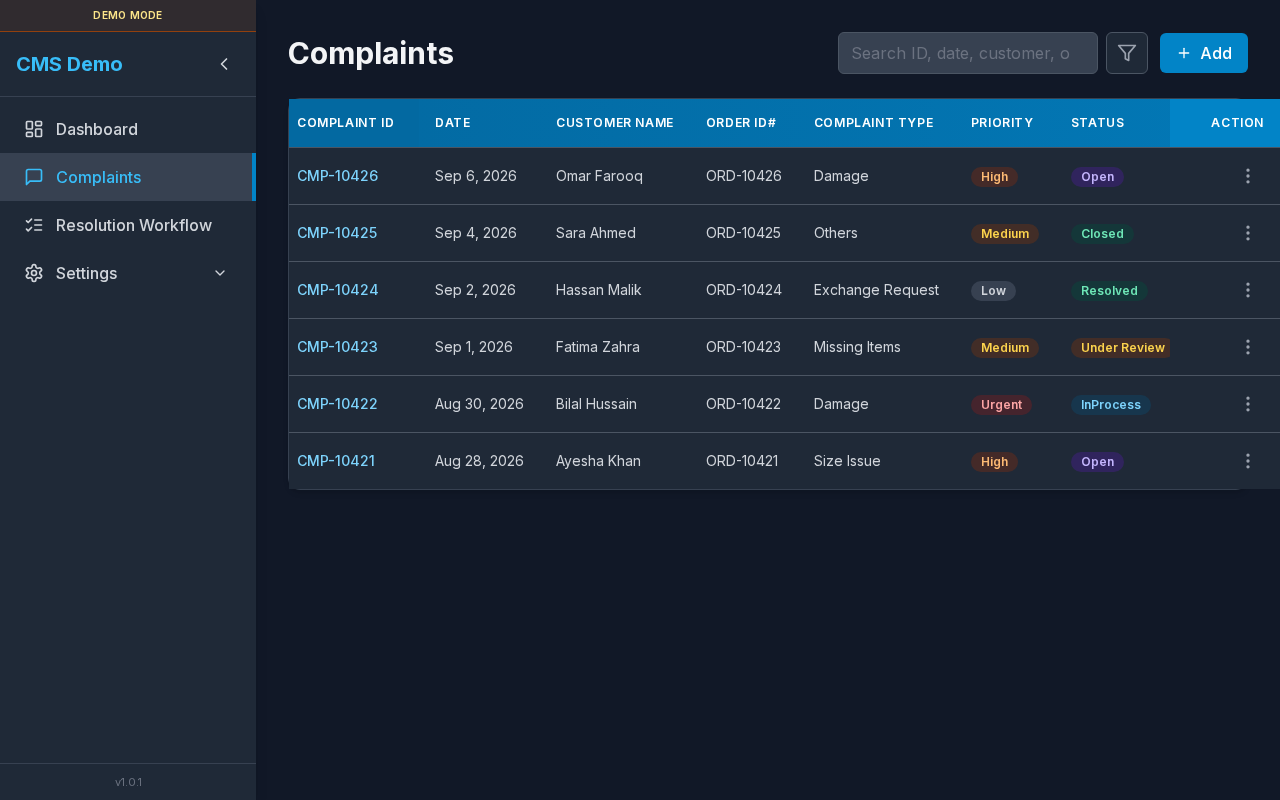
Header (search, filter, Add) and data table with sticky Complaint ID + Action columns.
Layout — regions
| Region | Contents |
|---|---|
| Title | Complaints |
| Search | Free-text search field |
| Filter | Icon → filter popover |
| Add | Add button (Edit permission) |
| Table | All complaint columns + Action |
| Modals | Detail, New/Edit form, Delete confirm, Workflow create |
Sub-details — search
| aria-label | Search complaints |
| Placeholder | Search ID, date, customer, order, tracking, type, priority, status, note… |
| Behavior | Debounced (~300ms); filters the table client-side |
Steps
- Click the search box.
- Type any keyword (e.g. customer name or
CMP-). - Table shows matching rows only.
- Clear the box to show all (still subject to filters).
Sub-details — filter popover
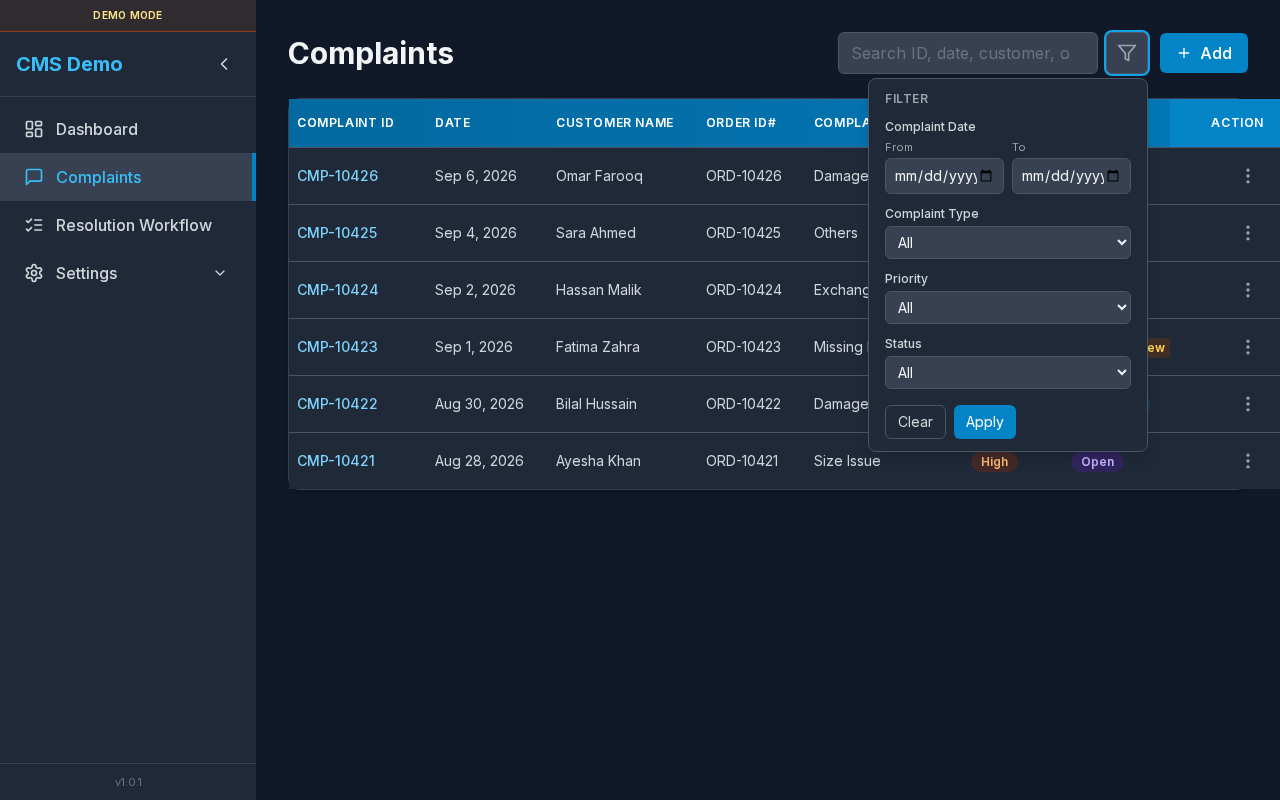
Filter panel: date range, type, priority, status.
| Control | Options |
|---|---|
| Section title | Filter |
| Complaint Date → From / To | Date inputs |
| Complaint Type | All + configured types |
| Priority | All, Low, Medium, High, Urgent |
| Status | All, Open, InProcess, Under Review, Resolved, Closed |
| Clear | Resets all filter fields |
| Apply | Applies filters to the table |
aria-label on icon: Filter complaints.
Steps — filter the list
- Click the Filter icon.
- Set any combination of date / type / priority / status.
- Click Apply.
- Icon may stay highlighted while filters are active.
- Click Clear then Apply (or Clear) to reset.
Empty filtered state: No results for current search or filters.
Sub-details — table columns
| Column | Description |
|---|---|
| Complaint ID | Clickable; opens detail modal |
| Date | Complaint date |
| Customer Name | Customer |
| Order ID# | Order reference |
| Complaint Type | Type name |
| Priority | Badge (Low / Medium / High / Urgent) |
| Status | Badge (Open / InProcess / Under Review / Resolved / Closed) |
| Note | Truncated; full text in detail |
| Old Tracking ID | Original tracking |
| New Order ID | From resolution workflow (if any) |
| New Tracking ID | From resolution workflow (if any) |
| Action | ⋮ menu |
Loading: Loading complaints…
Empty (no data): No complaints yet. Click Add to create one. (if you can edit)
Sub-details — row actions menu
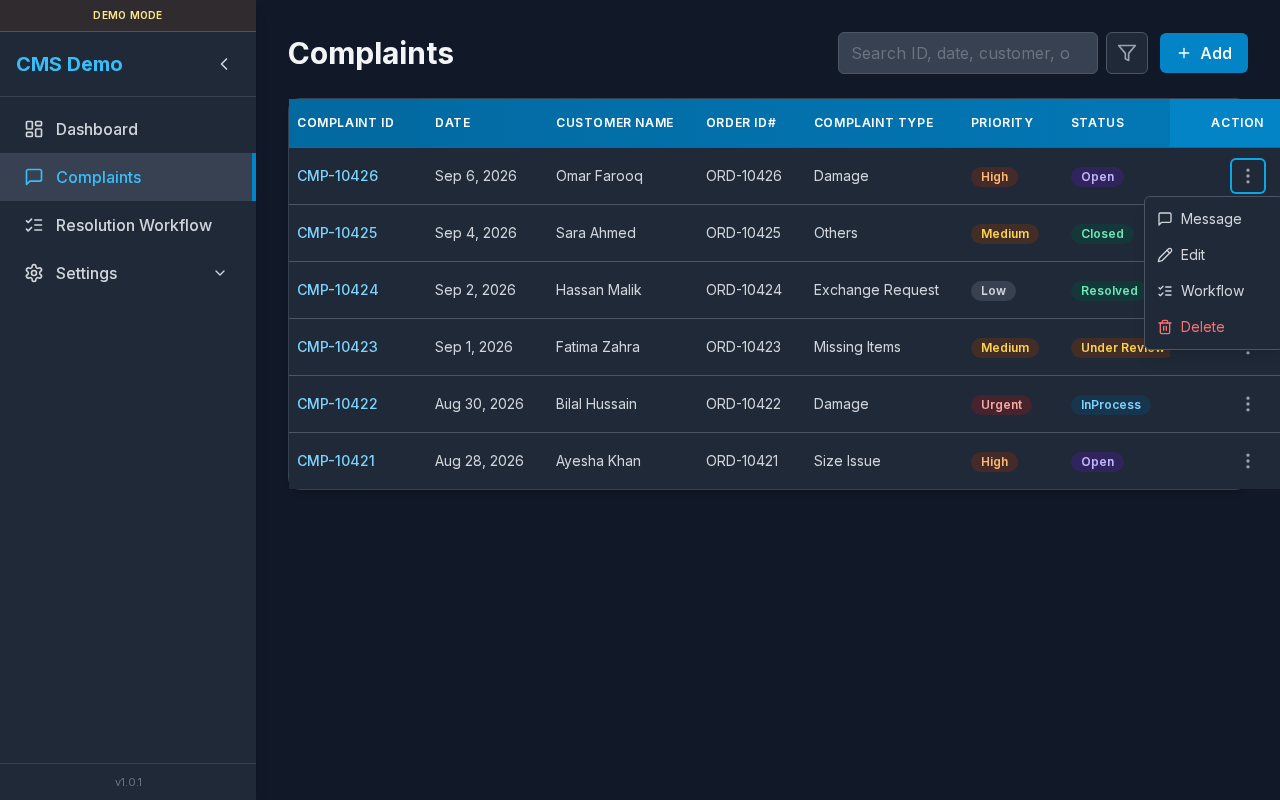
⋮ Actions: Message, Edit, Workflow, Delete.
| Menu item | Permission | Result |
|---|---|---|
| Message | View | Copies template for this type → toast Message copied for {Complaint ID} |
| Edit | Edit | Opens Edit Complaint form |
| Workflow | Edit on Resolution Workflow | Opens Resolution Workflow create modal for this row |
| Delete | Delete | Opens Delete complaint? confirm |
Message — errors
| Toast | Meaning |
|---|---|
| No message template found for this complaint type. | Type has no template in settings |
| Failed to copy message | Clipboard / browser blocked copy |
Steps — copy customer message
- Click ⋮ Actions on a row.
- Click Message.
- Paste into email/WhatsApp/etc.
Sub-details — complaint detail modal
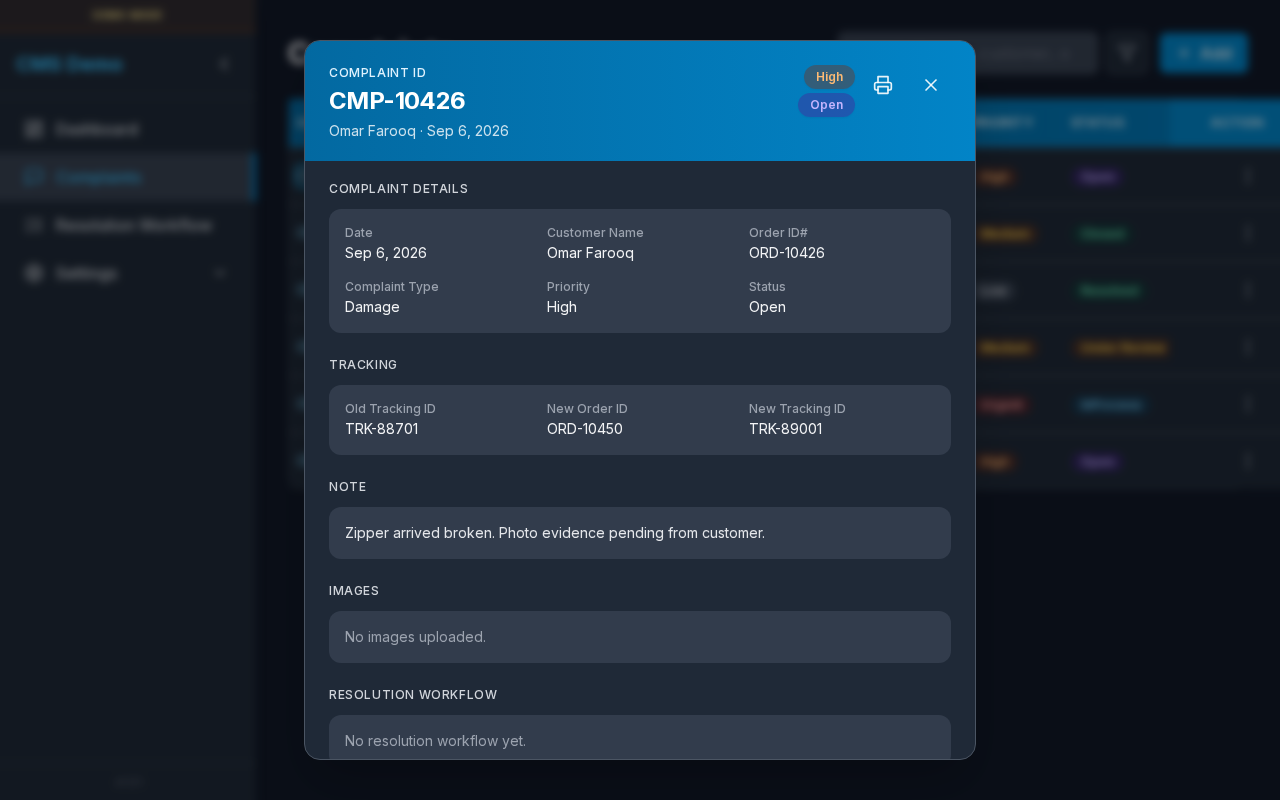
Detail dialog: badges, print, close, sections for details / tracking / note / images / workflows.
Header controls
| Control | Detail |
|---|---|
| Eyebrow | Complaint ID |
| Title | e.g. CMP-00001 |
| Subtitle | Customer · date |
| Badges | Priority + Status |
| aria Print complaint details → opens Print page | |
| Close | aria Close (X) |
Section — Complaint Details
Labels: Date, Customer Name, Order ID#, Complaint Type, Priority, Status
Section — Tracking
Labels: Old Tracking ID, New Order ID, New Tracking ID
Section — Note
Full complaint note text.
Section — Images
- Thumbnails (open in new tab) or
No images uploaded.
Section — Resolution Workflow
Loading workflow details…/No resolution workflow yet./ Workflow N blocks with Resolution Type, Refund Amount, Priority Override, Status, New Order ID, New Tracking ID, Agent Note
Steps — open detail
- Click the Complaint ID link in the table.
- Review sections.
- Optionally Print or Close.
Sub-details — Add / Edit form (New Complaint / Edit Complaint)
Also opened from Dashboard as New Complaint:
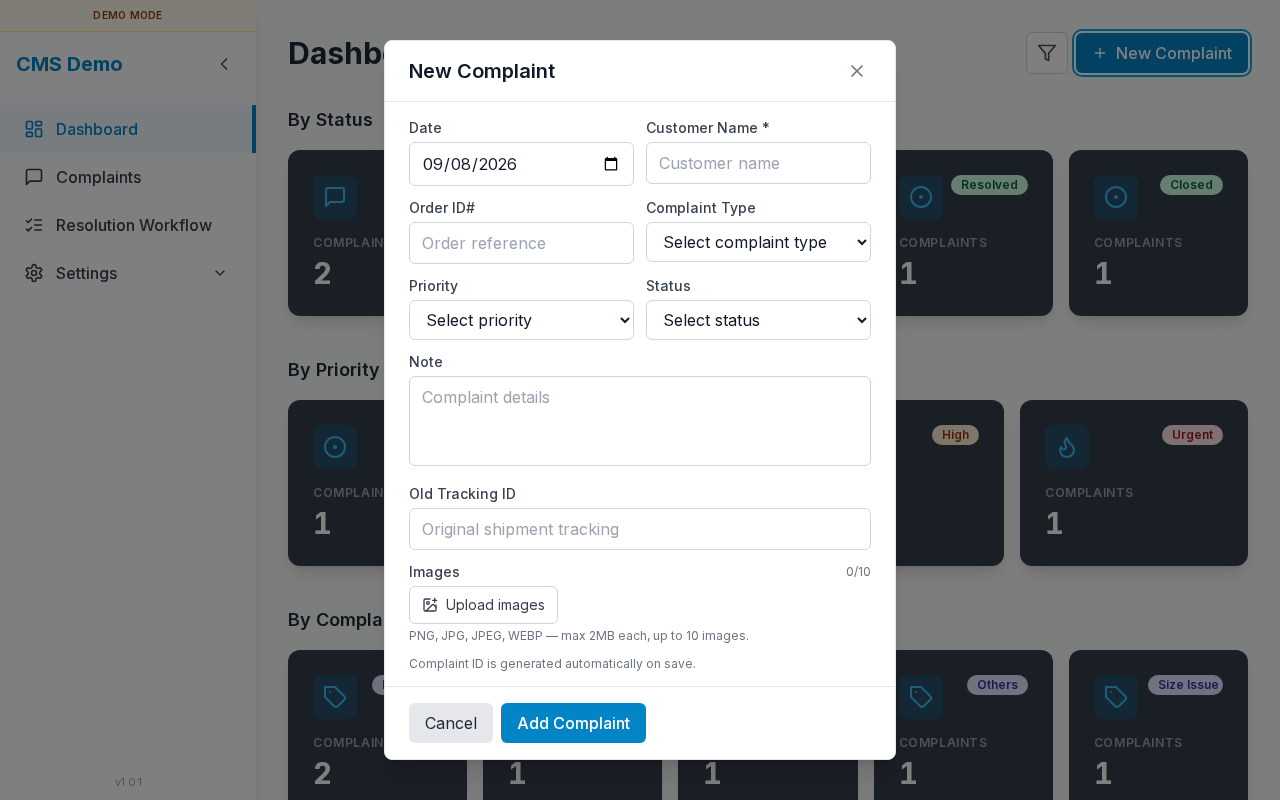
| Field | Required | Notes |
|---|---|---|
| Complaint ID | — | Edit only; read-only |
| Date | Yes | |
| Customer Name * | Yes | placeholder Customer name |
| Order ID# | No | Order reference |
| Complaint Type | Yes | Select complaint type |
| Priority | Yes | Low / Medium / High / Urgent |
| Status | Yes | Open / InProcess / Under Review / Resolved / Closed |
| Note | No | Complaint details |
| Old Tracking ID | No | Original shipment tracking |
| Images | No | Upload images — PNG/JPG/JPEG/WEBP, max 2MB each, up to 10 |
Helper on create: Complaint ID is generated automatically on save.
Buttons: Cancel · Add Complaint / Save / Saving…
Image validation messages
Maximum 10 images allowed.Only PNG, JPG, JPEG, WEBP images are allowed.Each image must be 2MB or smaller.Image upload failed
Steps — add
- Click Add.
- Fill required fields; optionally upload images.
- Click Add Complaint.
- List refreshes.
Steps — edit
- ⋮ → Edit.
- Change fields / images.
- Click Save.
Sub-details — delete confirm
| Title | Delete complaint? |
| Body | This cannot be undone. |
| Buttons | Cancel · Delete / Deleting… |
Steps
- ⋮ → Delete.
- Confirm Delete.
- Row disappears from the list.
Sub-details — Workflow from Complaints
Modal title: Resolution Workflow (create for this complaint).
| Field | Required | Notes |
|---|---|---|
| Complaint ID | — | Pre-filled / read-only |
| Resolution Type * | Yes | Full Refund, Item Exchange, Item Replace, From outlet, Others |
| Refund Amount * | If Full Refund | placeholder 0.00 |
| Agent Note | No | Resolution notes from agent |
| Priority Override * | Yes | Syncs to complaint on save |
| Status * | Yes | Syncs to complaint on save |
| New Order ID | No | New order reference |
| New Tracking ID | No | Tracking number |
Buttons: Save / Saving… · Cancel
Also available as a full page: Resolution Workflow.
Sub-details — mobile
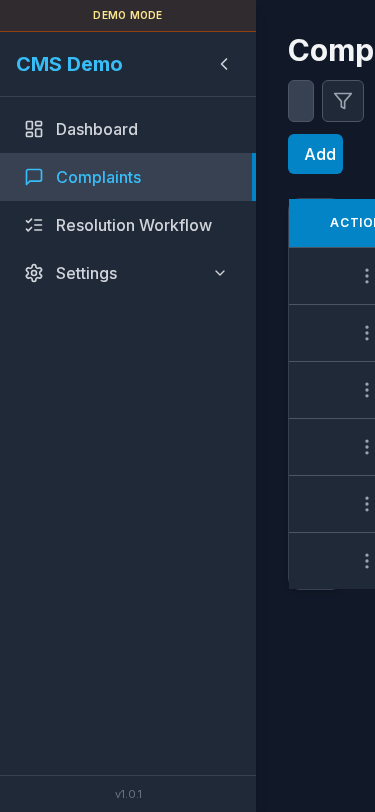
Stacked header controls; horizontal scroll on the table.
Errors & access
| Situation | UI |
|---|---|
| No view permission | “You do not have access to this page.” |
| List load failed | Message + Retry |
| Form validation | Inline red banner in modal |