Users and Access
Version: 1.0.1
| Route | /settings/users-access |
| Access | Admin role only |
| Permission key | settings-users-access |
Purpose
Create and manage team accounts and per-page View / Edit / Delete permissions.
Screenshot — users list
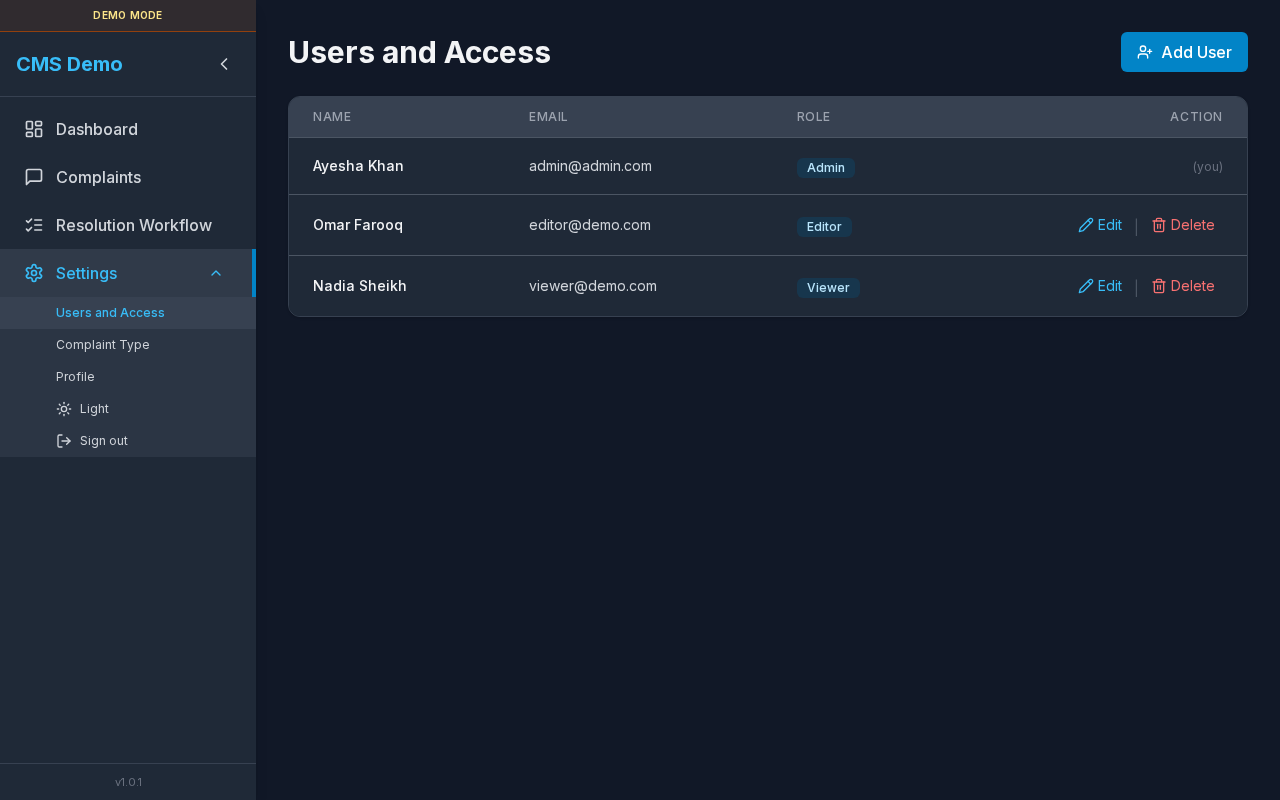
Add User button and users table (Name, Email, Role, Action).
Layout — regions
| Region | Contents |
|---|---|
| Title | Users and Access |
| Primary action | Add User |
| Table | Name · Email · Role · Action |
| Modal | Add User / Edit User (form + permission matrix) |
| Confirm | Delete user? |
Non-admins: redirected away; sidebar item hidden.
Sub-details — users table
| Column | Detail |
|---|---|
| Name | Display name; current user may show (you) |
| Login email | |
| Role | Admin / Editor / Viewer |
| Action | Edit · Delete (hidden for your own row) |
Empty: No users yet. Add one with the button above (Admin only).
Loading: Loading… / Redirecting…
Steps — open this page
- Sign in as Admin.
- Expand Settings.
- Click Users and Access.
Sub-details — Add / Edit User modal
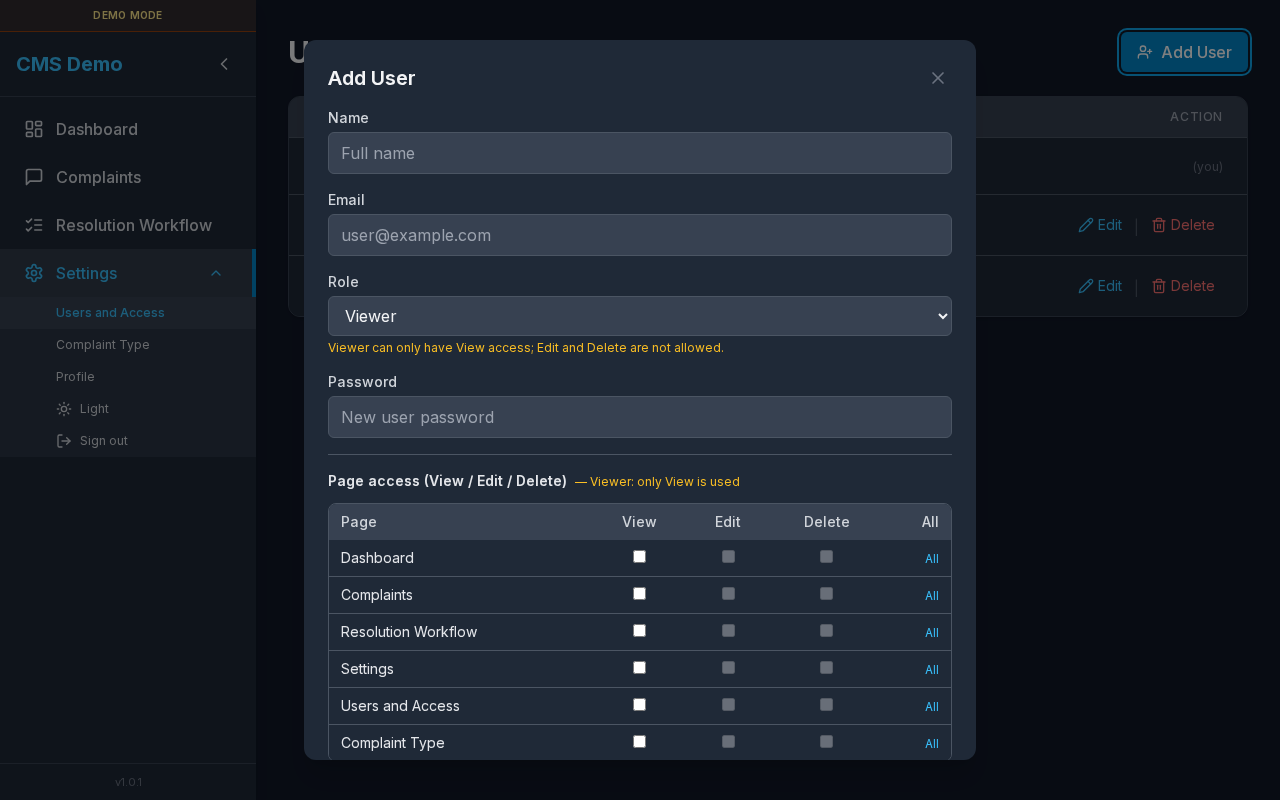
Name, email, role, password, and Page access matrix.
Modal titles
- Add User
- Edit User
Account fields
| Field | Create | Edit | Notes |
|---|---|---|---|
| Name | Required | Editable | placeholder Full name |
| Required | Locked | placeholder user@example.com · hint Email cannot be changed | |
| Role | Required | Editable | Admin / Editor / Viewer |
| Password | Required | Optional | Create: New user password · Edit: leave blank to keep · label may say Password (leave blank to keep current) |
Hint — Viewer role
Viewer can only have View access; Edit and Delete are not allowed.
Checkbox titles: Viewer role cannot have Edit / … Delete.
Sub-details — Page access matrix
Heading: Page access (View / Edit / Delete)
| Column | Meaning |
|---|---|
| Page | Feature area |
| View | Can open the page |
| Edit | Can create/update |
| Delete | Can delete |
| All | Toggle all three for that row |
Pages in the matrix
| Page label | Permission key |
|---|---|
| Dashboard | dashboard |
| Complaints | complaints |
| Resolution Workflow | resolution-workflow |
| Settings | settings |
| Users and Access | settings-users-access |
| Complaint Type | settings-complaint-type |
Role behavior (summary)
| Role | Matrix behavior |
|---|---|
| Admin | Full access applied (all pages) |
| Editor | Custom View / Edit / Delete per page |
| Viewer | View only; Edit/Delete forced off |
More detail: Roles & Permissions.
Modal buttons
| Button | When |
|---|---|
Add User / Adding… | Create |
Save / Saving… | Edit |
| Cancel | Close |
| Close (X) | aria Close |
Steps — add a user
- Click Add User.
- Fill Name, Email, Role, Password.
- Adjust Page access checkboxes (or leave Admin defaults).
- For Viewer, only enable View where needed.
- Click Add User.
- Table refreshes.
Steps — edit a user
- Click Edit on a row (not yourself).
- Update name, role, permissions; optionally set a new password.
- Click Save.
Sub-details — delete user
| Title | Delete user? |
| Body | Are you sure you want to delete "{name}" ({email})? This cannot be undone. |
| Buttons | Cancel · Delete |
Rules
- You cannot delete your own account from this screen.
- Only Admin can edit/delete users.
Steps
- Click Delete on a row.
- Confirm in the dialog.
Errors (examples)
| Message | Context |
|---|---|
| Password is required for new users | Create without password |
| Failed to load users / user | Fetch error |
| Failed to create / update / delete user | Save error |
| Cannot delete your own account | API / UI guard |
| Only Admin can edit/delete users | Non-admin attempt |
Related
Sidebar Settings menu: