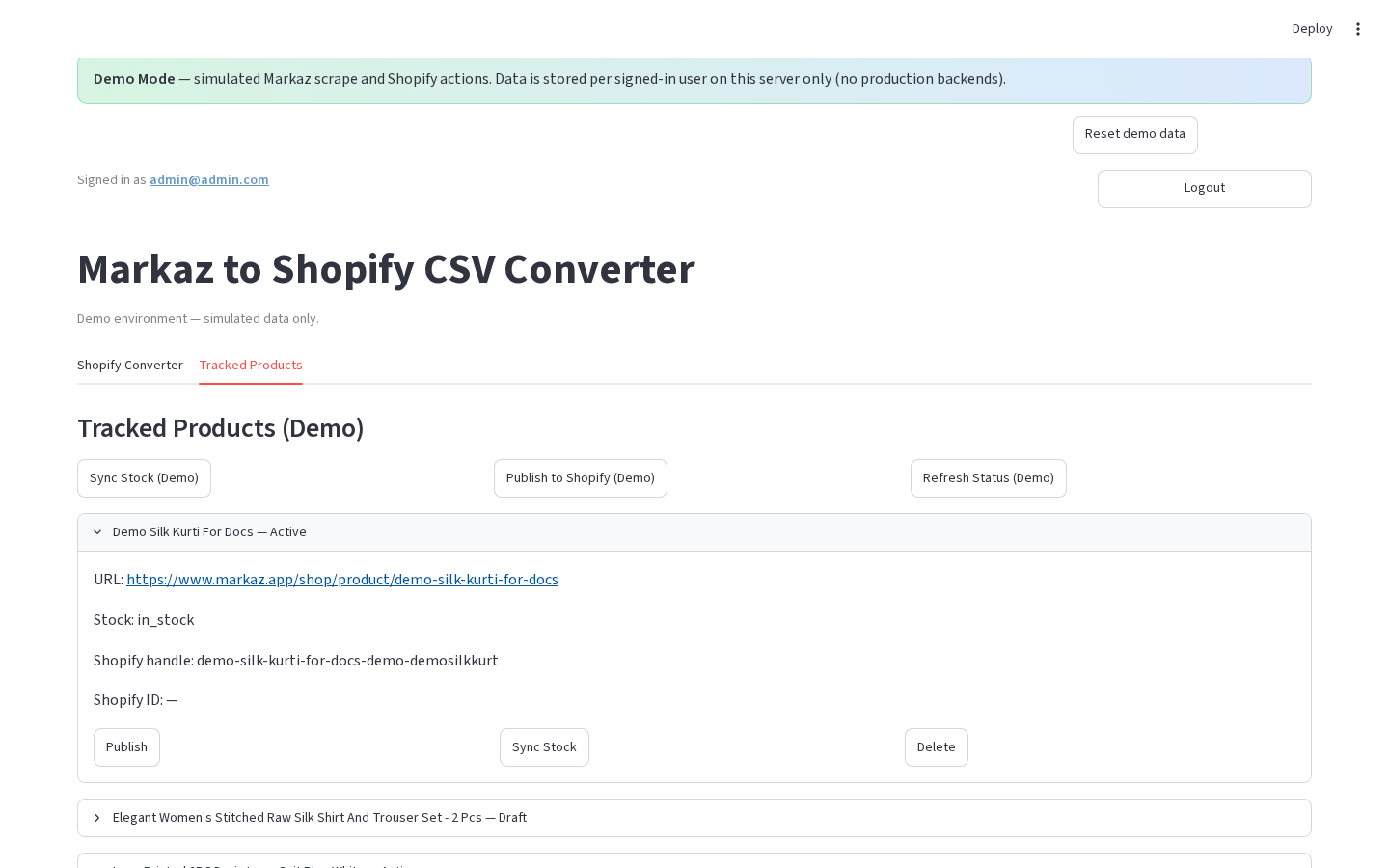
Tracked product card
Version: 1.0.0
Route: / → Tracked Products → row expander
Who can access: signed-in users


What this page does
Each tracked Markaz URL appears as an expandable card with status fields and row-level actions.
Layout at a glance
| Area | Content |
|---|---|
| Header | Title + Shopify status label (e.g. Active / Draft / Not on Shopify) |
| Body | URL, stock, Shopify handle / ID (and more fields in production) |
| Actions | Per-row buttons |
Steps
- On Tracked Products, click a row header (chevron) to expand.
- Review Markaz URL, stock, and Shopify metadata.
- Use a row action:
- Publish / Publish Shopify
- Sync Stock
- Delete
- Production also: Refresh Status, Shopify Status
- Collapse the row or continue to the next product.
Fields (demo card)
| Field | Example |
|---|---|
| URL | Markaz product link |
| Stock | in_stock / other |
| Shopify handle | demo-… |
| Shopify ID | ID or — |
Production extras
Cards can also show Markaz stock label, Shopify status (colored), published timestamps, Open in Shopify, last checked / saved times.
Errors & edge cases
- Delete removes the tracked row (and may remove Shopify product when linked in production).
- Demo publish/sync always show the demo Shopify warning banner.