Introduction
Version: 1.0.0 · Released: 2026-09-08
Route: / (main dashboard after login); start at /login
Who can access
Anyone with a valid account can open the app. In Demo Mode, the login screen shows clickable account cards (Admin, Editor, Viewer). Viewer is read-only. Admin and Editor can post, schedule, and reset demo data.
Screenshots

What this page does
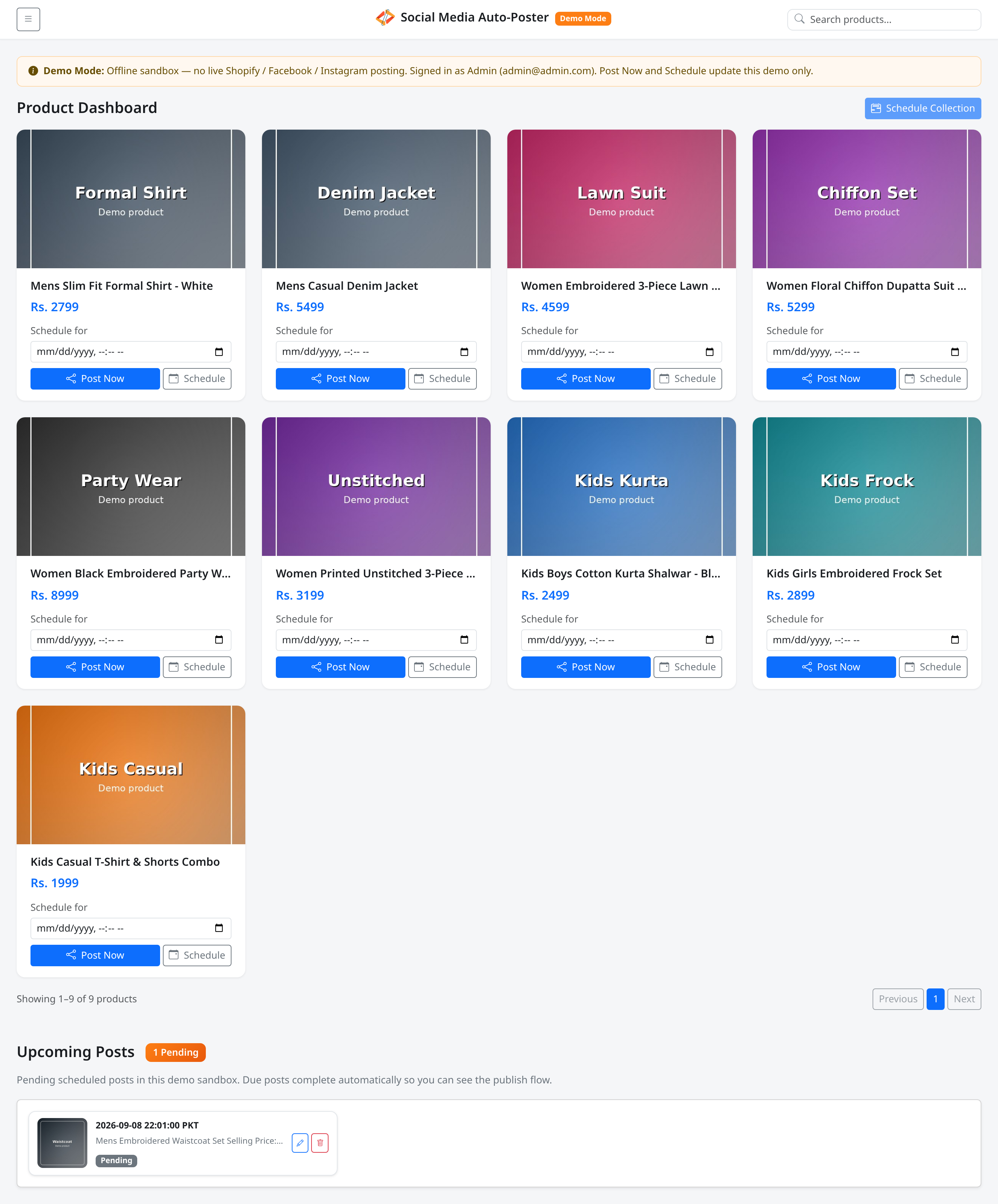
Social Media Auto-Poster is a private dashboard for store teams. It lists products (from Shopify in production; sample catalog in Demo Mode) and helps you publish them to Facebook and Instagram — either immediately with Post Now, or later with Schedule.
The app prepares a consistent caption (title, selling price, order link) and tracks what is already posted or scheduled so the grid stays clear.
Layout at a glance
| Area | What you see |
|---|---|
| Login | Account sign-in (Demo Mode: account cards + Email / Password) |
| Navbar | Menu button, brand name, Search products... |
| Sidebar (Menu) | Collections (All, Mens, Womens, Kids), Show Published/Scheduled, Log out, Reset demo (write roles) |
| Product grid | Cards with image, title, price, Post Now / Schedule |
| Upcoming Posts | Pending schedules with edit and remove (write roles) |
Steps — typical day
- Open the app and sign in from Log in (or choose a Demo Mode account card).
- Open Menu and pick a collection, or leave All.
- Use Search products... if you need a specific title.
- On a product card, click Post Now, or set Schedule for and click Schedule.
- For many items at once, select a collection, then click Schedule Collection.
- Review Upcoming Posts at the bottom; edit or remove pending items as needed.
- When finished, open Menu and click Log out.
Permissions
| Role | Can browse | Post Now / Schedule | Reset demo |
|---|---|---|---|
| Admin | Yes | Yes | Yes |
| Editor | Yes | Yes | Yes |
| Viewer | Yes | No | No |
Production vs Demo Mode
- Production: Connects to Shopify, Meta, and your backend schedule processor (cron).
- Demo Mode: Offline sandbox — no live Shopify / Facebook / Instagram posting. Due schedules complete automatically so you can see the flow. A Demo Mode banner and badge make this clear.
Scheduling times use Pakistan Standard Time (PKT / Asia/Karachi).
Errors & edge cases
- If you open
/while signed out, you are sent to/login. - Viewer accounts show products and upcoming posts but no write controls.
- If every product is posted or scheduled, turn on Show Published/Scheduled in the menu to see them again.