Custom Payment Pages
Version: 1.0.0
Route: /payments/custom/[slug] (Demo example: /payments/custom/adjustment-notes)
Who can access: Typically can_view on parent payments (custom pages use parent permission until a dedicated key is granted).
Screenshot(s)
What this page does
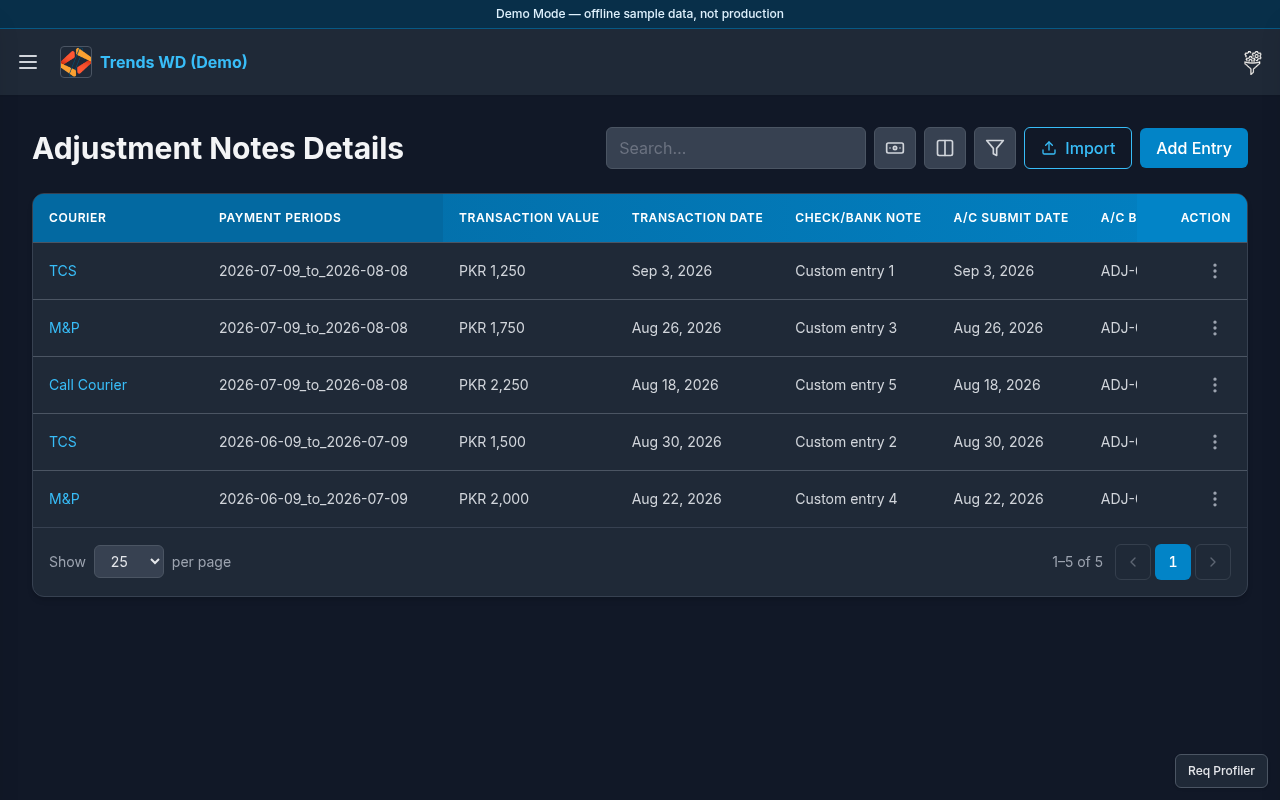
Shows user-defined COD payment pages created in COD Payments Setup. Demo Mode seeds Adjustment Notes as a custom page.
Layout
- Heading uses the custom page name (e.g. Adjustment Notes)
- Entries: transaction value, date, check/bank note, A/C submit date, bill no., notes
- Appears under sidebar COD Payments after system pages
Steps
- Click Open menu → COD Payments → Adjustment Notes (or your custom page name).
- Review custom entries linked to payment invoices.
- Click Add Entry to add an adjustment (when
can_editallows). - To create more custom pages: Click Open menu → Settings → COD Payments Setup → Add Page.
Permissions
Custom routes under /payments/custom/ map to payments (or a dedicated payments-* key if configured). Admin bypasses.
Errors
| Situation | Notes |
|---|---|
| 404 / empty page | Slug not found — check COD Payments Setup |
| Menu item missing | Page deleted or hidden by permissions |